


Senthil Kumar
Author
Published on : Aug 10, 2026
Category : BizTalk360 Monitoring
BizTalk message process relies heavily on IIS-hosted endpoints (WCF/HTTP adapters in Receive/Send Ports) to handle real-time integrations between business systems. In this context, IIS logs are often the only visibility layer into request failures, latency spikes, and throttling before they cascade into missed SLAs or failed transactions.
BizTalk’s dependency on IIS: Receive/Send ports exposed via HTTP/SOAP/REST adapters run through IIS, making IIS health directly tied to integration uptime.
Business impact of blind spots: A single unmonitored IIS failure can silently break order processing, EDI exchanges, or partner API calls, often discovered only after downstream complaints.
Compliance and audit need many BizTalk deployments sit in regulated industries (finance, healthcare, logistics) where request/response logs are needed for traceability. With the optimized log visibility to trace the transactions interruption with IIS log monitoring.
Early warning signal: IIS logs surface degrading response times or rising error rates before they escalate into full outages, giving ops teams lead time to act.
For instance, after deploying a new API version, IIS may start logging 401 Unauthorized errors on certain methods this indicating the requesting user lacks the required permission set, a signal that surfaces in logs well before it’s reported as a business issue.
Collecting every line of an IIS W3C log including 200 status codes, static asset request, every health check — can increase I/O overhead on the server and bloats storage without adding diagnostic value. BizTalk360’s IIS Server management addresses this directly through targeted Log Collection Filters, letting administrator to collect only operationally relevant logs.
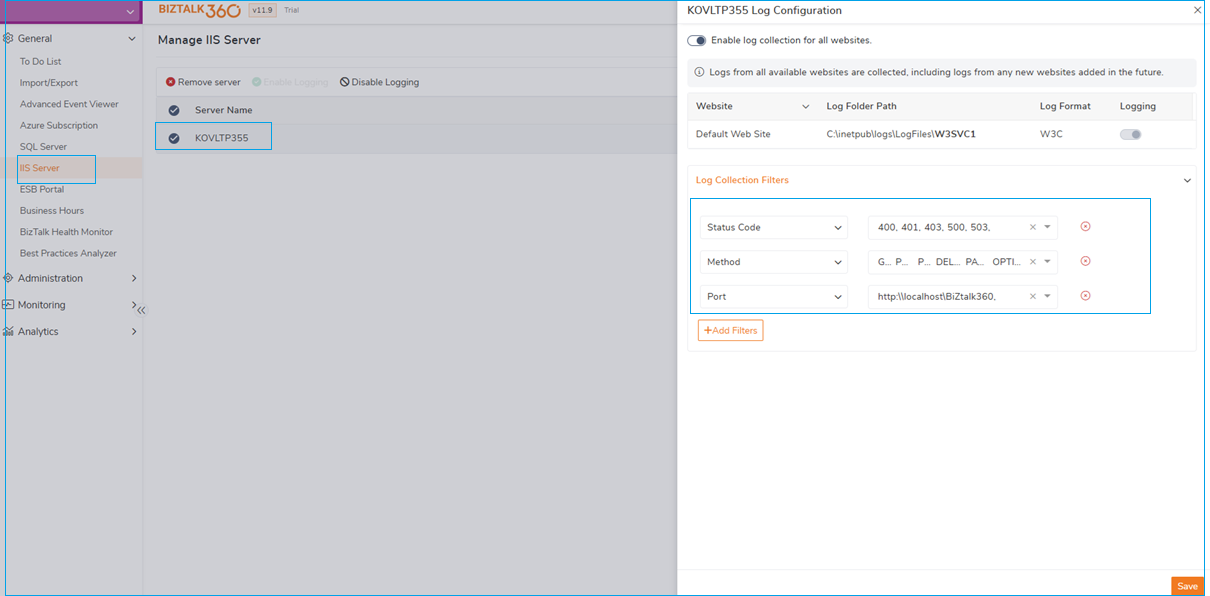
Enable logging at the website level: BizTalk360 lets you turn on log collection per website (here, Default Web Site under W3SVC1) rather than blanket-enabling every site on the server, so only the endpoints that matter to your integration layer are tracked.
Filter by status code: Instead of ingesting the full spectrum of response codes, the configuration narrows collection to 400, 401, 403, 500, and 503 — the codes that indicate a problem (bad requests, auth failures, forbidden access, server errors, service unavailability). Successful 200/301 traffic, which typically makes up the bulk of log volume, is excluded from collection.
Filter by method: Scoping collection to specific HTTP methods (GET, POST, DELETE, PATCH, OPTIONS) ensures the logs capture the operations relevant to BizTalk transaction flows, without noise from irrelevant verbs.
Filter by port/endpoint: Restricting collection to a specific port or path filters scoped the integration endpoints logs collection, rather than every site hosted on the same IIS server.
Throughput impact: Because filtering happens at the collection layer rather than post-processing, the server writes and processes a fraction of the log volume it otherwise would. This reduces disk I/O contention, lowers CPU overhead from log parsing, and keeps the monitoring pipeline itself lightweight, the IIS log monitoring adds visibility without becoming a performance tax. It also means the 401 examples from the earlier section gets surfaced immediately, since error-code filtering is already tuned to catch it, rather than being buried in a firehose of routine 200s.
Effective IIS log monitoring isn’t about collecting every field available it’s about tracking the key metrics that indicate API health and availability. For BizTalk-integrated environments, the following are the essential core metrics:
In a logistics organization, on-time shipment tracking depends on a chain of APIs working together for order creation, carrier dispatch, and shipment status updates. If one of these APIs fails, it can delay dispatches, tracking data, and impact delivery SLAs across the supply chain.
This is where metric-driven alerting closes the gap between detection and action. In the example configuration above, an alert named “Track-Shipping API 401” is configured to the Default Web Site and filtered to POST requests returning a 401-status code on the shipping endpoint. Rather than waiting for a manual log review, the system is configured to warn after 10 matching log entries and escalate to an error after 20, within a rolling 15-minute window a permission or authentication issue on the shipping API before it silently blocks order processing.
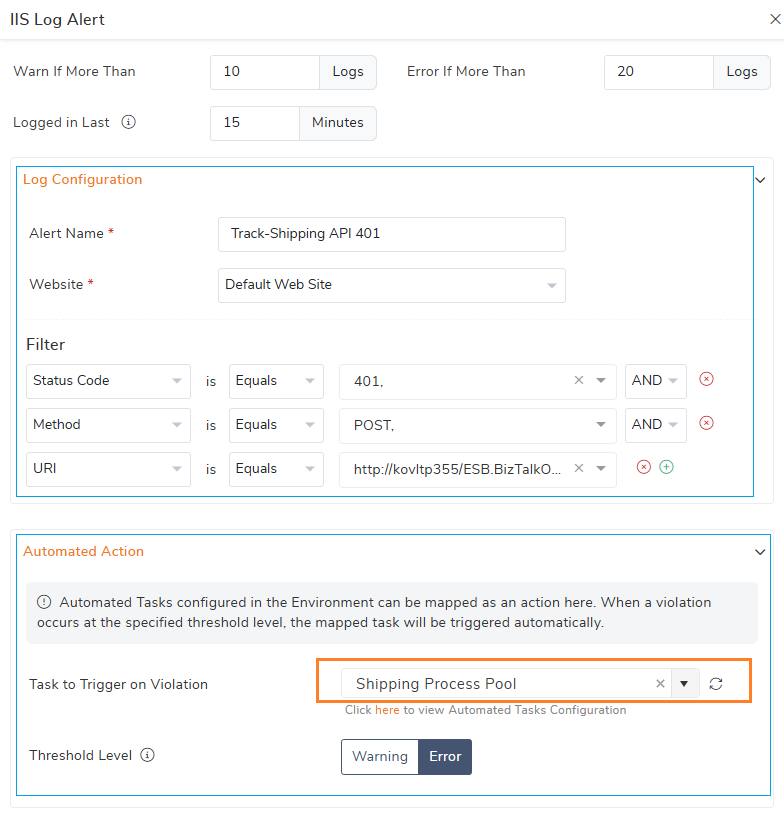
Detecting a problem early is only half the equation done, the real value of IIS log monitoring comes from what happens next. BizTalk360’s Automated Tasks bridge the gap between detection and recovery by triggering predefined corrective actions as soon as an alert threshold is exceeded.
In the example configuration above, the “Shipping Process Pool” task is built specifically to restore API availability when the shipping process starts failing. Its workflow runs in two coordinated steps:
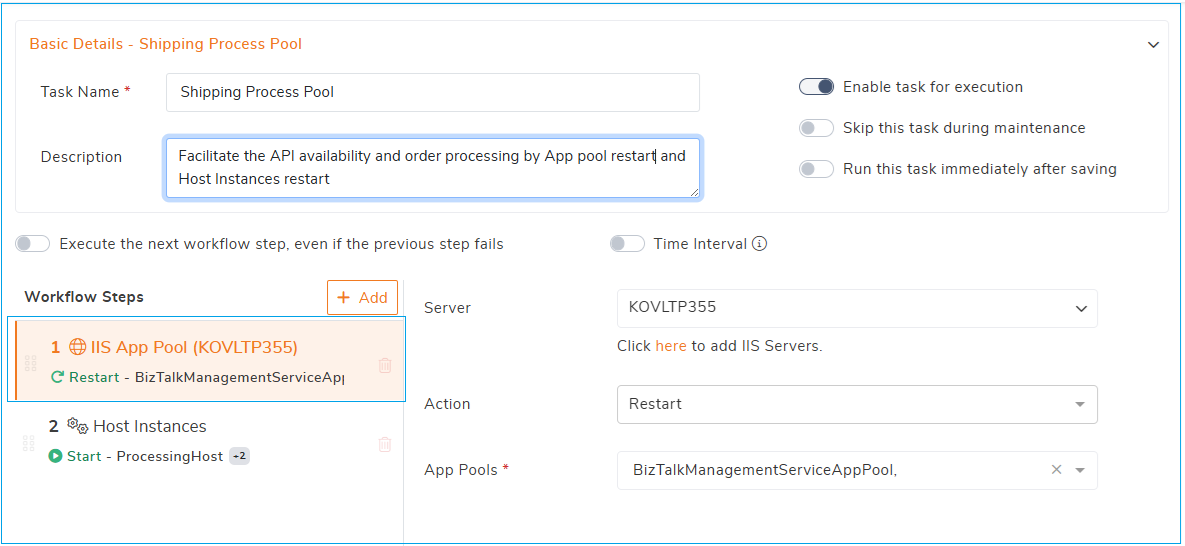
Step 1 — Restart the IIS App Pool: On the KOVLTP355 server, the BizTalkManagementServiceAppPool is restarted rather than just recycled. A restart re-establishes the app pool’s identity against Active Directory, syncing the account’s group memberships and permissions with the latest AD policy changes. This directly resolves 401 Unauthorized errors caused by stale cached credentials or recent AD group policy updates that a simple recycle wouldn’t pick up, since recycling only replaces the worker process without refreshing the identity token.
Step 2 — Restart Host Instances: Once the app pool is restarted, as the next step the associated Processing Host instances are started, ensuring BizTalk’s message processing resumes cleanly rather than left orphaned mid-cycle.
Tied back to the earlier alert example, this task is exactly what gets triggered when “Track-Shipping API 401” crosses its error threshold that the alert detects the authentication failures on the shipping API, and this automated task responds by cycling the app pool and restarting host instances, restoring order processing before the delay cascades into missed shipment SLAs.
This is the practical payoff of the whole monitoring chain covered in this post: optimized log collection keeps the pipeline lightweight, key metrics and alerts catch the right failures fast, and automated tasks act on them in seconds which turning IIS log monitoring from a passive diagnostic tool into an active safeguard for both performance and API availability.
The outcome is clear with IIS Log monitoring strategy that actively supports business continuity not just reports on failures after they occur.
The latest version of BizTalk360 offers more features with more control on your BizTalk environments. Try out the BizTalk360 which provides reliable monitoring with lesser manual interaction and more control during the maintenance.