


Mithesh Krishna Kumar
Author
Published on : Jun 8, 2026
Category : BizTalk360 Update
In many organizations, BizTalk Server quietly powers critical business processes in the background. Processing orders, exchanging invoices, handling partner integrations which is the kind of work that nobody notices until something goes wrong.
But while BizTalk is robust and reliable solution for the typical integration scenarios in BizTalk Environment, the way it is traditionally managed often creates an unintended challenge.
Operations become too technical.
A simple question like “Why did this order fail?” can quickly turn into a dependency on developers or senior administrators. Accessing the BizTalk Administration Console, understanding artifacts like receive locations or orchestrations, or even identifying failed messages is not straightforward for someone outside the technical team.
Over time, this creates a familiar pattern: business teams lack visibility, support teams feel blocked, and developers end up handling routine operational issues that really shouldn’t need their attention.
What makes BizTalk360 different is not just that it adds features on top of BizTalk. It changes how people interact with it.
Instead of exposing users to the complexity of the underlying system, it presents a clean, web-based interface that focuses on what matters in day-to-day operations.
A non-technical user doesn’t need to understand what a “send port” is. They just need to know: did the message go through or not?
BizTalk360 answers that question instantly. Dashboards give a clear view of system health, ongoing processes, and failures in a way that feels intuitive. Without digging into multiple tools or servers, users can quickly spot if something needs attention.
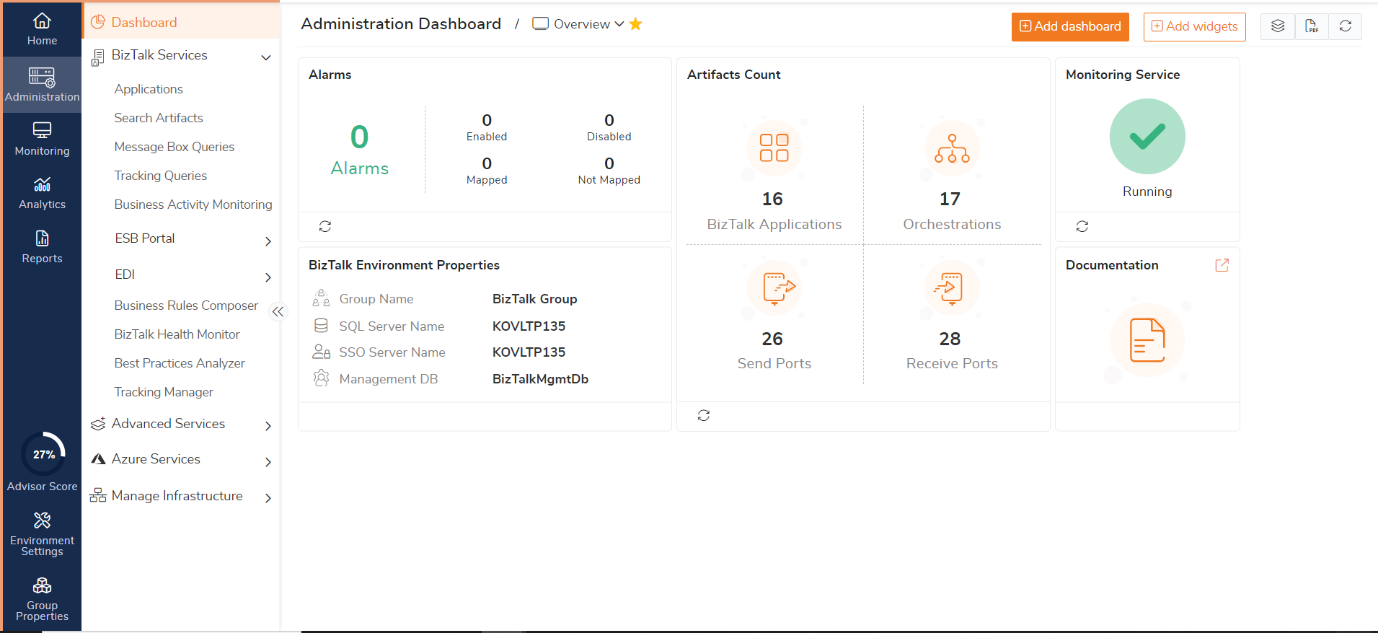
For non-technical and support teams, managing multiple integration technologies like ESB, EDI, BAM, BHM, and BRE through separate tools can quickly become overwhelming. Different consoles, disconnected monitoring experiences, and scattered operational data often make day-to-day support more complex than it needs to be.
BizTalk360 simplifies this by bringing these integration technologies together into a single web-based platform, giving teams one centralized place to manage and monitor the entire environment.
With BizTalk360, teams can:
Instead of navigating multiple consoles and servers, operations and support teams get a unified operational experience inside BizTalk360. This reduces complexity, improves visibility, and helps both technical and non-technical users work more efficiently across the entire integration ecosystem.
In traditional setups, even minor issues get escalated. A failed message? Escalate. A stopped service? Escalate. When retry needed? Escalate. Not because the issue is complex, but because the tools are.
BizTalk360 changes this dynamic by simplifying how issues are presented and handled. Failed messages are no longer buried inside technical consoles. They’re surfaced clearly, along with meaningful error information.
More importantly, actions like resubmitting a message or retrying a process are made accessible in a controlled, user-friendly way. First-level support teams can resolve a large percentage of issues on their own, without waiting on developers.
One of the biggest concerns when opening operational access to non-technical users is safety. What if someone accidentally stops a critical process? What if too much access is given?
BizTalk360 addresses this with granular role-based access control. Rather than an all-or-nothing approach, organizations can define exactly what each user can see and do. A business user might only track transactions, while a support engineer can handle resubmissions without touching configurations.
It’s a balance where teams are empowered to act, but within safe boundaries.
Traditionally, managing BizTalk means logging into servers, using remote desktop connections, and navigating complex admin tools. BizTalk360 removes that dependency entirely. Everything is accessible through a browser.
This might sound like a small change, but the impact is real. Operations teams can work faster, security overhead is reduced, and the friction of accessing production environments goes away. For non-technical users, it also removes the intimidation factor that comes with handling backend systems directly.
One of the bigger shifts BizTalk360 brings is in how issues are detected and handled. In many environments, problems only surface after they’ve already impacted the business when a partner raises a concern or a transaction fails downstream. That reactive cycle puts unnecessary pressure on support teams and delays resolution.
BizTalk360 introduces proactive monitoring and intelligent alerting, so teams are notified the moment something deviates from expected behaviour. But it doesn’t stop at alerts. With automated corrective actions, the system can step in on its own like restarting a stopped service, triggering a predefined action, or stabilizing a known issue without waiting for manual intervention.
Operations become less about watching and responding, and more about the system quietly taking care of itself. Non-technical users can trust that BizTalk360 will both flag and, in many cases, fix issues automatically so they can focus only on what genuinely needs their attention.
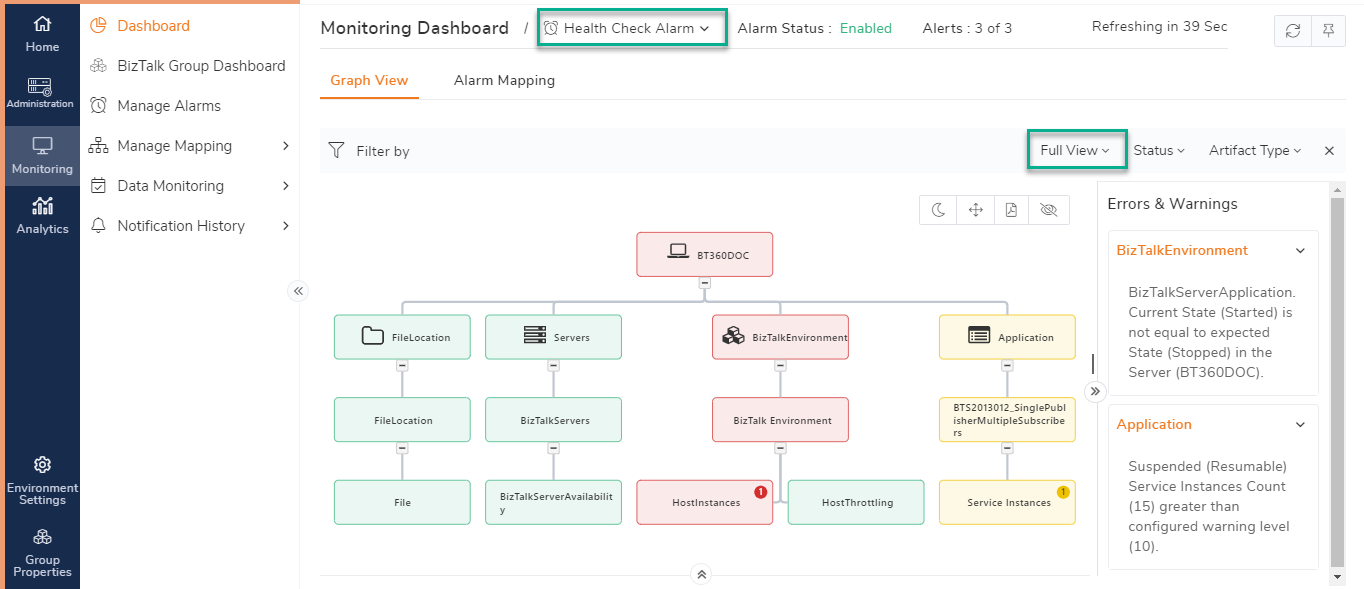
Learn More about the monitoring dashboard
Modern BizTalk environments don’t live in isolation. Many organizations run Azure Logic Apps, Service Bus, and other Azure services alongside their BizTalk infrastructure, and monitoring them through separate tools only creates extra overhead.
BizTalk360 brings Azure services into the same monitoring experience. Logic Apps can be viewed, managed, and monitored directly within BizTalk360, allowing teams to check run history, enable or disable workflows, and resubmit failed runs without switching platforms. It extends the same simplicity and visibility from BizTalk into the cloud layer.
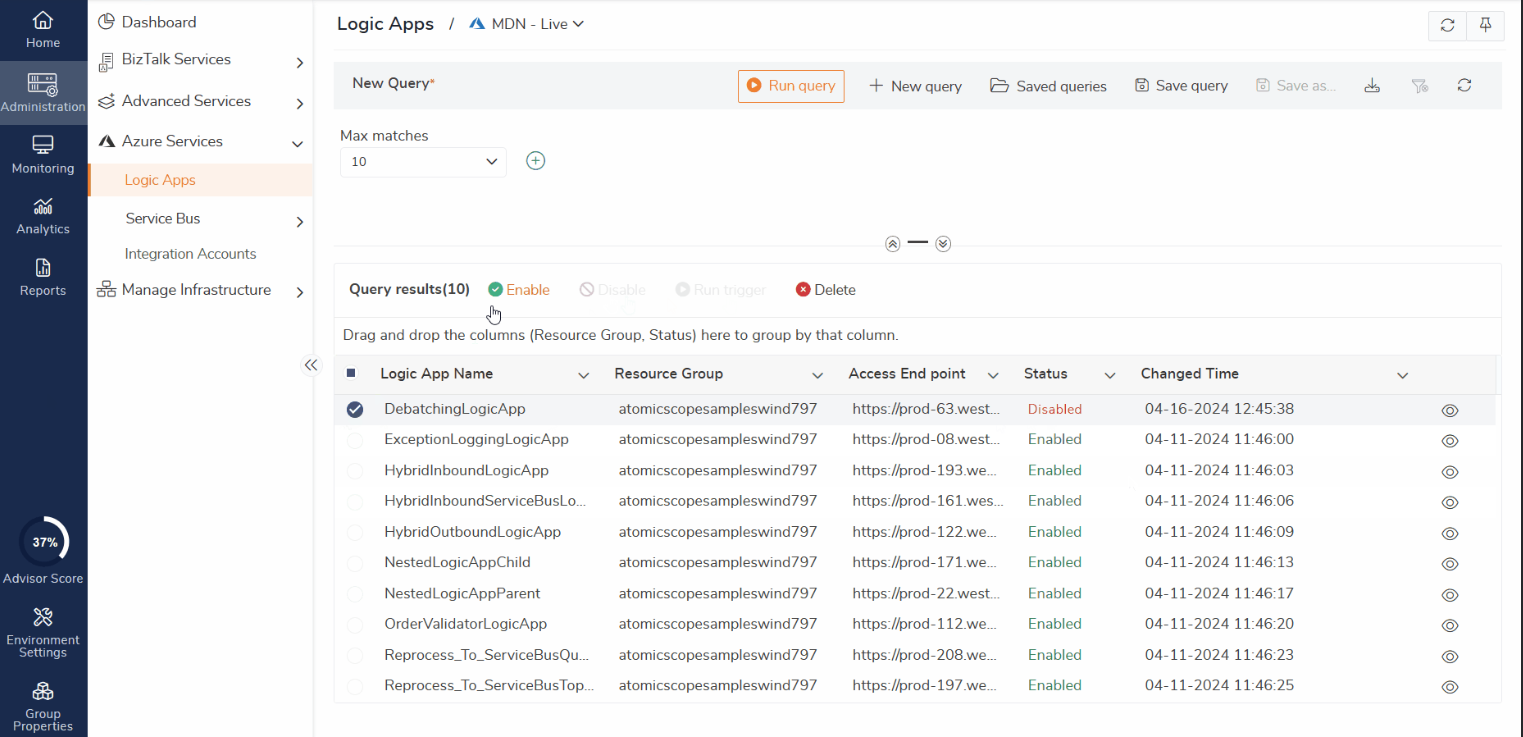
Learn More about Azure Services in BizTalk360
Knowing something went wrong is only valuable if the right person is informed quickly.
BizTalk360 supports multiple notification channels, allowing teams to receive alerts through the platforms they already use, including email, Microsoft Teams, Slack, and other integrations. This ensures organizations are not dependent on a single communication method for critical issues.
The notifications themselves are designed to be actionable. Instead of sending a vague alert, BizTalk360 provides meaningful context about the issue, helping recipients understand what happened and respond faster without having to start the investigation from scratch.
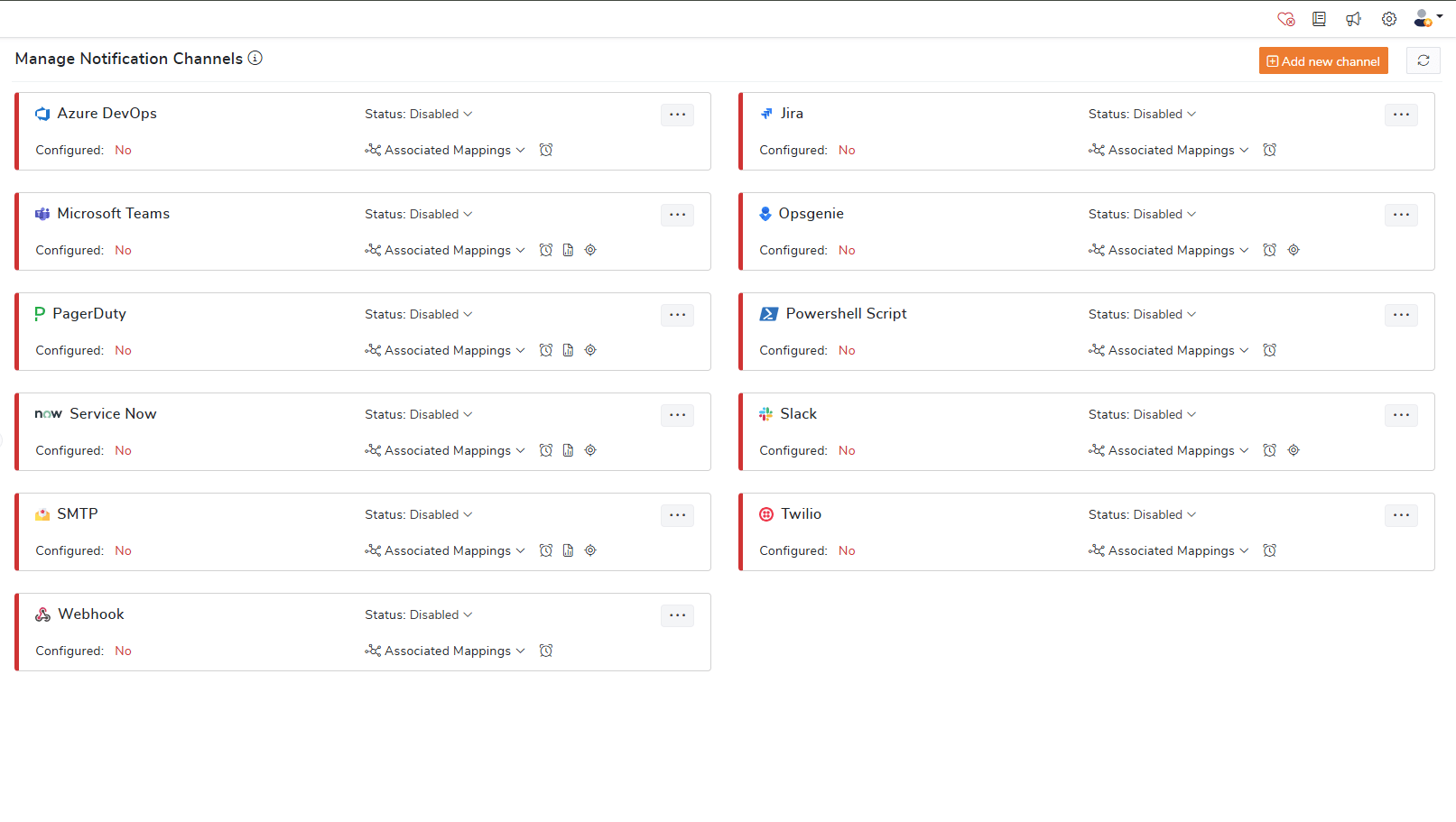
Learn More about Notification Channels
Day-to-day operations become far more manageable when teams can identify patterns instead of only reacting to isolated incidents.
BizTalk360’s Analytics section provides a historical view of environment performance, helping teams understand trends over time rather than focusing only on immediate issues. Customizable dashboards allow organizations to track the metrics that matter most to them, while shared dashboards ensure teams are aligned with the same operational insights.
Scheduled reports also make it easy for managers and stakeholders to stay informed through regular summaries, without needing to log into the platform themselves.
This shifts the conversation from simply asking “What is broken right now?” to understanding “How has the environment been performing over time?” — a far more proactive and informed way to manage operations.
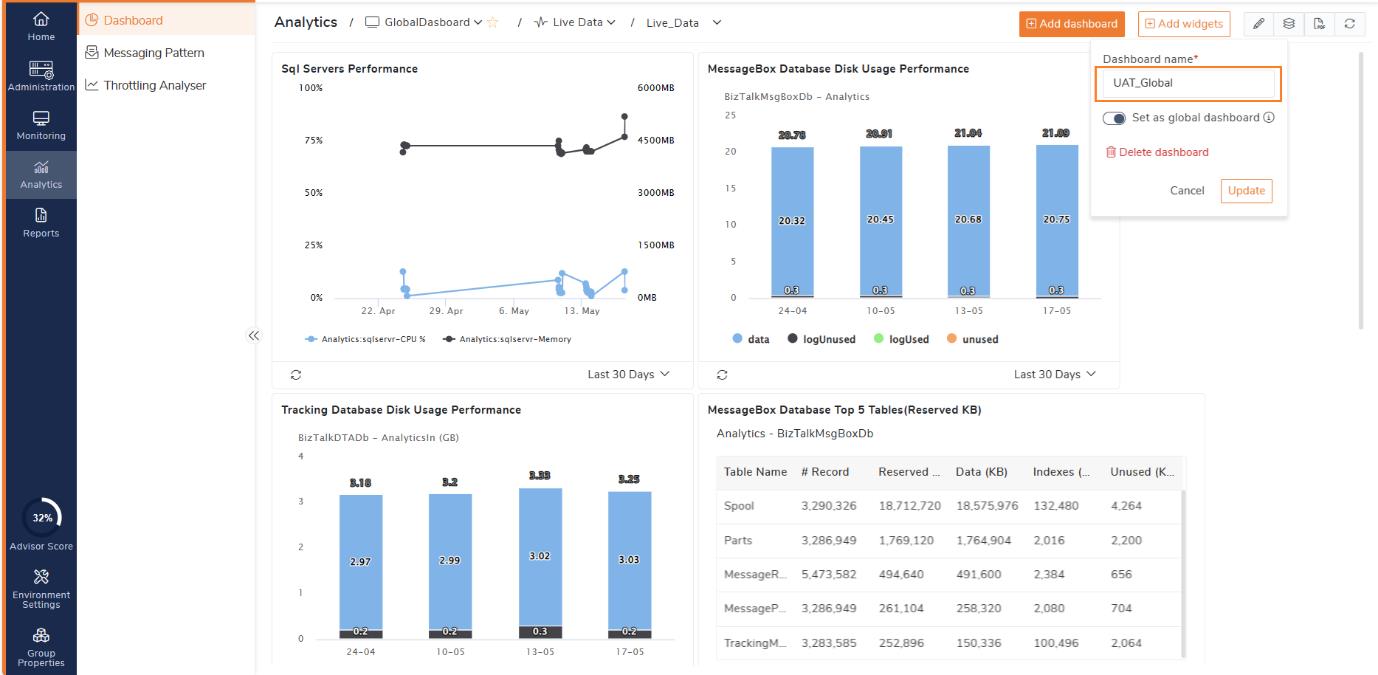
Learn More about Analytics Dashboard
Throttling is one of those issues that often goes unnoticed until business processes start getting delayed. When BizTalk comes under stress, it slows down message processing, but identifying the exact cause traditionally requires deep technical expertise and manual analysis of performance counters and logs.
BizTalk360’s Throttling Analyser simplifies this completely. It presents throttling data in a clear, visual way, helping teams quickly understand when the system is under pressure, what is causing it, and how long it has been happening.
This allows operations teams to detect performance issues early, escalate them with proper context, and respond proactively instead of reacting after failures occur.
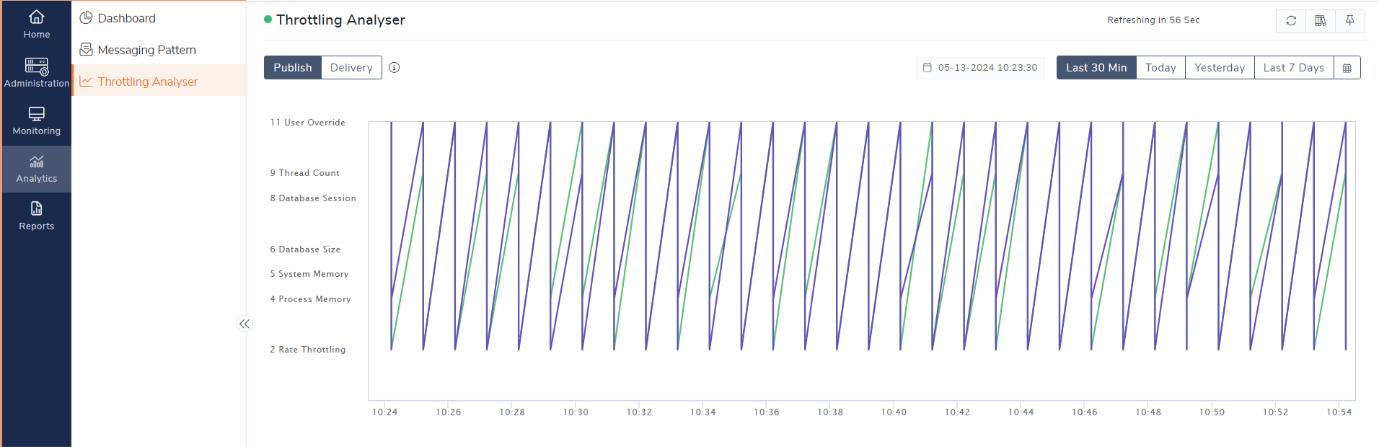
Learn More about Throttling Analyser
In many BizTalk environments, the same issues keep repeating, but teams still spend time searching through emails, documents, or waiting for developer support to find the resolution.
BizTalk360 addresses this with its integrated Knowledge Base feature. Teams can create articles and directly map them to specific error codes, event IDs, exception messages, service instances, or throttling conditions. When the issue occurs again, BizTalk360 automatically displays the relevant Knowledge Base article alongside the error, helping users quickly understand the cause and resolution without additional investigation.
Because the guidance is available directly within the monitoring experience, support teams can resolve issues faster, reduce dependency on developers, and build a more efficient operational process over time.
Explore the BizTalk360 Knowledge Base
Perhaps the most underrated advantage is how BizTalk360 brings visibility closer to the people who need it.
Technical logs and message IDs don’t mean much to someone in operations or finance. They care about outcomes. Did the order go through? Was the invoice processed? Is the partner integration working?
BizTalk360 makes it possible to track at a level that aligns with business context, so non-technical stakeholders can get the answers they need without having to go through IT every single time.
When non-technical teams can handle day-to-day operations confidently, the impact goes beyond convenience. Support teams become more efficient. Developers stop getting pulled into routine issues. Resolution times improve. And the relationship between business and IT becomes a lot smoother.
What was once a tightly controlled, technically heavy environment starts to feel more accessible and responsive to everyone involved.
BizTalk Server remains a powerful integration platform but managing it does not have to be complex. BizTalk360 takes a more practical approach by simplifying operational tasks, improving visibility, and helping non-technical teams manage environments without constant dependence on deep BizTalk expertise.
It is not just about making BizTalk easier to manage. It is about making it easier for people to work with.
To know more about the BizTalk360 features, try out the free trial or book a demo.