
BizTalk360 is one stop tool to manage your BizTalk environments with powerful Monitoring, Administrative capabilities.
Let us see how BizTalk360 effectively manage the Services Instances.
In BizTalk environments, failed or suspended service instances can silently interrupt critical business transactions. Relying solely on reactive monitoring often means teams discover issues only after business impact has already occurred.
In a typical Microsoft BizTalk Server environment, service instances represent the live execution of your integrations like order processing, invoice submissions, EDI exchanges, API orchestration, and internal system synchronization. When these service instances fail or become suspended, the impact goes far beyond the middleware layer.
A suspended orchestration might mean:
The real challenge is that many of these failures occur without immediate visibility.
Many teams still rely heavily on reactive monitoring manually checking the Admin Console, responding to user complaints, or waiting for downstream systems to report missing data. By the time issue is detected, the damage is already done:
Service instances can fail for many reasons including,
Without proactive monitoring and automated handling, suspended instances accumulate rapidly in the Message Box database. Performance degrades. Troubleshooting becomes harder because engineers must sift through historical noise to find the real issue.
In high-volume environments, even a short monitoring gap can translate into hundreds or thousands of unprocessed transactions.
Modern BizTalk operations require:
Let us see how BizTalk360 Service Instances monitoring and automated tasks proactively act to avoid the transactions failures.
When it comes to managing your BizTalk environment, BizTalk360 offers a comprehensive set of capabilities designed to keep business transactions running smoothly.
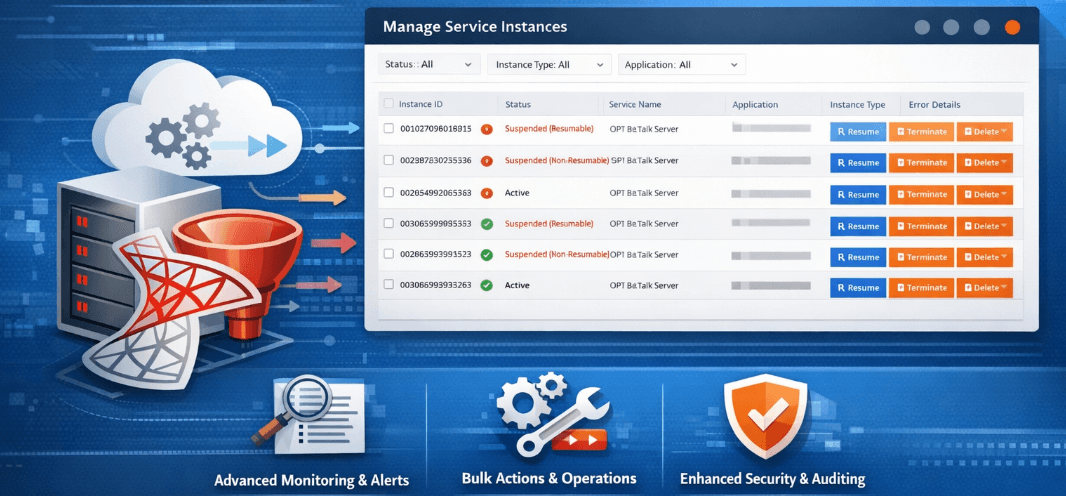
With powerful Service Instance management, including bulk operations and archive options, teams can quickly resolve and maintain large volumes of transactions. Threshold and Data Monitoring enable proactive oversight, while Automated Tasks and Automated Actions help address potential issues before they impact operations. On top of that, built-in Analytics metrics provide clear visibility into performance trends and recurring challenges, empowering teams to make informed decisions and continuously optimize their environment.
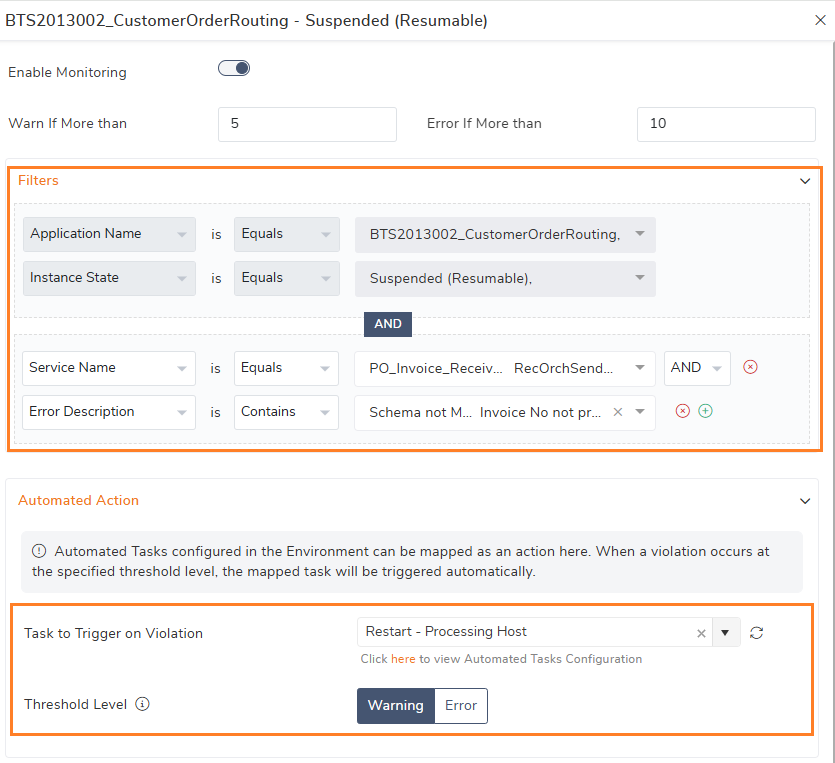
When an incorrect schema is deployed, one that doesn’t align with the transform schema configured in the Send Pipeline. This situation can immediately disrupt message processing and push transactions into a suspended state.
With BizTalk360 Data Monitoring, you can proactively track such failures and configure automated actions on suspended service instances. Instead of relying on manual intervention, the system can automatically resume valid instances once the schema issue is corrected reducing downtime, preventing transaction backlogs, and keeping business operations moving without disruption.
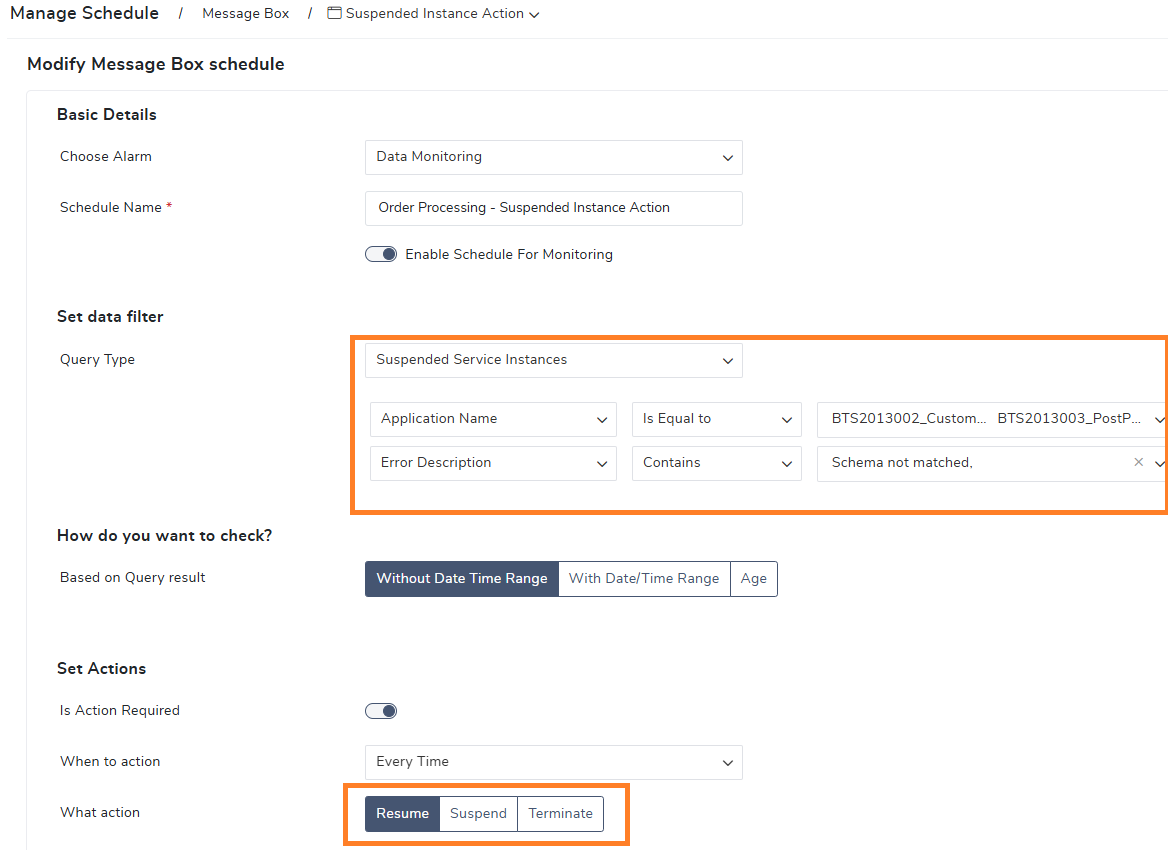
This feature is widely used by many customers over a decade in-order to take control of business transactions without degrading the performance.
In earlier versions, Service Instance monitoring was limited to detecting issues based solely on instance status. In the latest version, monitoring has been enhanced with metric-based threshold rules and advanced filtering capabilities, enabling more precise detection and refined monitoring results.
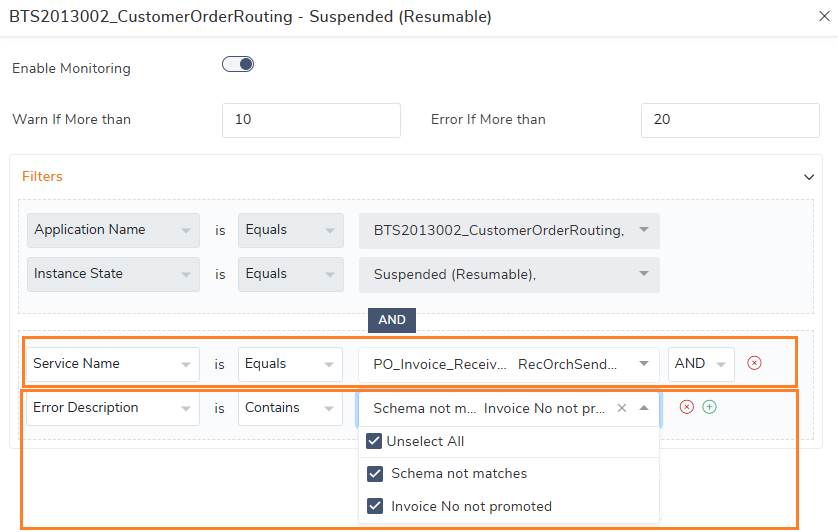
With the multiple filter search options, instances monitoring can cover the multiple failure scenarios in a single threshold rule configuration. It helps the operation teams to validate the business transaction from the single view.

Monitoring the service instances is no longer just about visibility, it’s about decisive action.
With enhanced Service Instance Monitoring, automated tasks can now trigger corrective measures the moment predefined conditions are met. Instead of waiting for manual intervention, the system can automatically:
By combining automated actions with configured threshold rules, you can proactively respond to abnormal conditions before they escalate into business disruptions.
For example, when files are not being processed at a receive location, it often signals that the associated Host Instances are in a throttled state. Instead of waiting for manual intervention, automated tasks can immediately trigger corrective measures such as restarting the impacted Host Instances. This will help in restoring the normal processing and minimizing downtime.
This approach shifts operations from reactive firefighting to controlled, intelligent remediation ensuring business continuity without constant manual monitoring.
Service instances often face other real-world scenarios such as suspended messages, failed orchestrations, or unusually long processing times. Left unchecked, these can disrupt critical business transactions and escalate quickly.
The result of proactive monitoring and automation?
Faster resolution. Reduced operational overhead. Greater confidence in business continuity.
Automation isn’t just about convenience, it’s about ensuring your integration platform stays resilient, responsive, and business-ready always.
The modern integration environments demand more than basic health checks. They require intelligent monitoring that not only detects issues but actively helps to prevent business disruption.
Smarter Monitoring
Instead of relying solely on service instance status, monitoring now incorporates threshold-based detection and refined filtering. This enables you to identify abnormal service instance volumes, recurring failures, or performance bottlenecks before they escalate. It’s about spotting patterns early avoid the business disruption.
Smarter Monitoring
Instead of relying solely on service instance status, monitoring now incorporates threshold-based detection and refined filtering. This enables you to identify abnormal service instance volumes, recurring failures, or performance bottlenecks before they escalate. It’s about spotting patterns early avoid the business disruption.
Greater Control
With enhanced filtering capabilities and automated corrective actions, teams gain precise control over service instances. Whether it’s restarting host instances, stopping artifacts, or executing predefined scripts, actions can be triggered automatically when thresholds are breached. You define the rules. The system executes them consistently.
Confident Operations
Reduced manual intervention leads to fewer firefighting scenarios. Automated responses shorten resolution time and minimize business disruption. Teams can focus on optimization and innovation rather than repetitive operational tasks.
Security & Auditing
BizTalk360 enforces role-based access through user access policies, ensuring operational users can view and manage only the service instances relevant to them. It maintains a detailed audit trail of all service instance operations, tracks corrective actions taken during monitoring, and captures activities performed through the BizTalk Admin Console. This provides complete operational transparency, accountability, and governance across the environment.
The outcome is clear: improved stability, better visibility, and a monitoring strategy that actively supports business continuity not just reports on failures after they occur.
The latest version of BizTalk360 offers more features with more control on your BizTalk environments. Try out the BizTalk360 which provides reliable monitoring with lesser manual interaction and more control during the maintenance.
