


Saranya
Author
Published on : Nov 13, 2026
Category : BizTalk360 Update
Modern integration environments depend on multiple interconnected components, including BizTalk Server, SQL Server, Azure Logic Apps, and supporting infrastructure. Keeping these components healthy, secure, and available is essential for uninterrupted business operations.
With BizTalk360 v12.0, we are introducing several enhancements to simplify infrastructure monitoring, improve operational visibility, and make administration more efficient.
Let’s explore what’s new and how these capabilities help address common operational challenges.
As part of BizTalk360 v12.0, we have upgraded the underlying Angular frameworks and third-party packages to keep the platform aligned with evolving technology standards.
The release includes framework and package upgrades, enhanced UI components, improved styling, and security-related dependency updates. These improvements also help address vulnerable and deprecated dependencies while providing a more consistent user experience.
As frameworks and third-party libraries evolve, older dependencies may become outdated or contain known vulnerabilities.
With the platform modernization introduced in v12.0, organizations benefit from updated dependencies and improved UI components. This provides a stronger foundation for future enhancements while helping maintain the security and usability of the platform.
Certificates play an important role in securing communication between applications and infrastructure components. An expired certificate can cause authentication or certificate validation failures, potentially disrupting services that depend on secure connections.
Consider an organization where multiple applications, including BizTalk Server, communicate with SQL Server using encrypted connections.
The TLS certificate configured on SQL Server is approaching its expiry date. If the certificate expires without renewal, applications may encounter certificate validation errors, depending on their connection and certificate validation settings.
With SQL Server Certificate Monitoring, administrators can monitor certificate and receive notifications before its expiry. This gives the operations team sufficient time to renew the certificate and avoid unexpected connectivity issues.
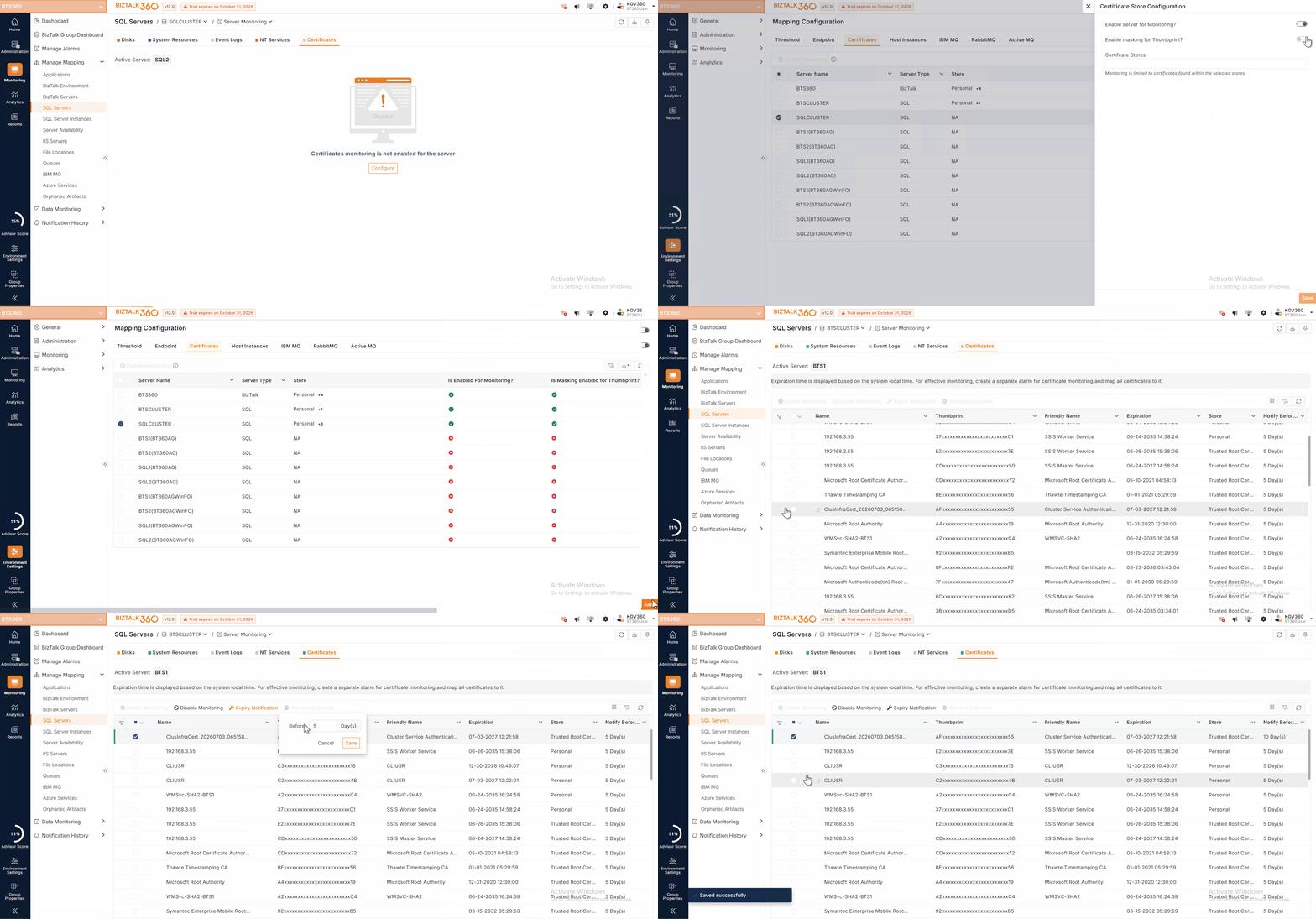
Administrators can:
By proactively monitoring certificate expiry, organizations can reduce the risk of service disruption and maintain secure communication.
SQL Server high-availability configurations help organizations maintain database availability during infrastructure failures. However, unexpected failovers, replica role changes, or cluster node failures need to be identified quickly to minimize operational impact.
Consider a two-node Windows cluster with Node 1 configured as the preferred active node and Node 2 serving as the secondary node.
If Node 1 becomes unavailable, the cluster may fail over to Node 2, depending on the cluster configuration.
Without continuous monitoring, administrators may not immediately know that the active node has changed.
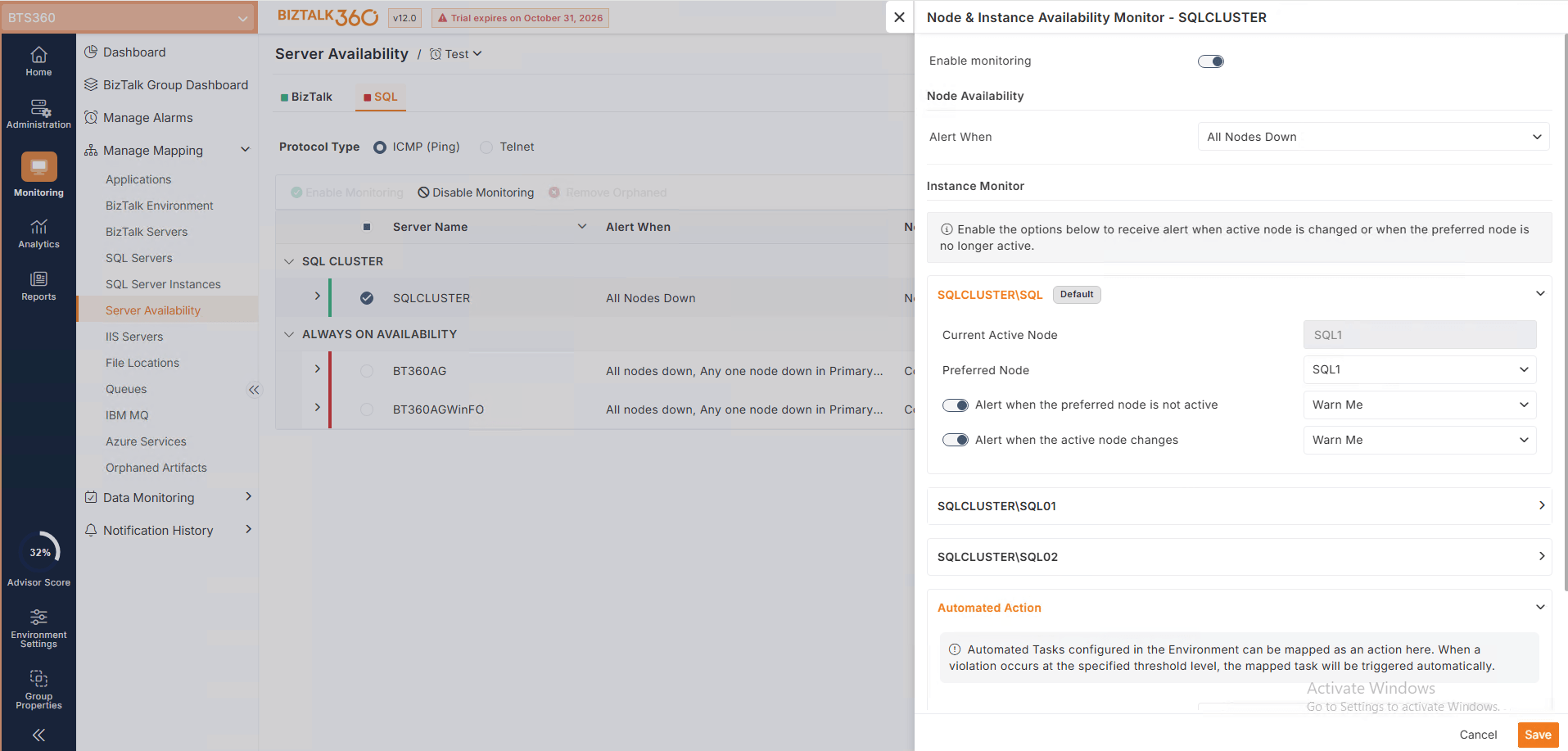
With BizTalk360 v12.0, the preferred active node can be configured, and alerts can be triggered when Node 1 is no longer active or when the active node changes. If both nodes become unavailable, the team can receive an alert indicating that the entire cluster is down.
This helps administrators identify unexpected failovers and respond before they cause extended service disruption.
Consider an SQL Server Always On Availability Group with two replicas: Replica 1 configured as the preferred primary and Replica 2 as the secondary replica.
If Replica 1 becomes unavailable, SQL Server may promote Replica 2 to primary, depending on the Availability Group configuration.
BizTalk360 can monitor the preferred primary replica and alert administrators when the preferred replica is no longer primary or when the primary replica changes.
This provides visibility into database role changes and helps operations teams investigate unexpected failovers.
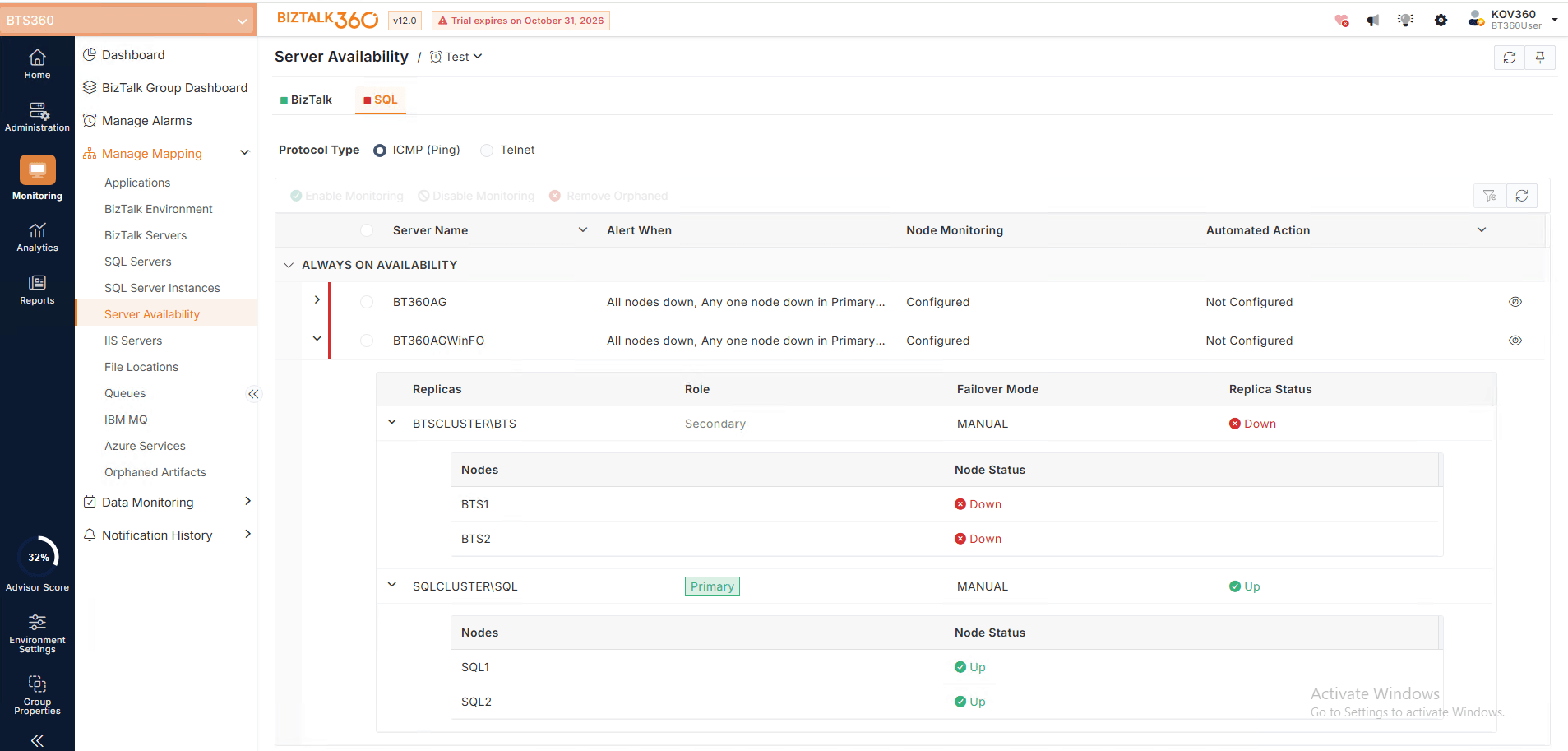
Administrators can configure preferred active nodes and primary replicas, monitor node availability, and receive alerts when:
When a cluster node or Availability Group monitoring violation occurs, administrators may need to perform predefined operational tasks, such as sending notifications or triggering scripts.
By mapping automated tasks to monitoring violations, BizTalk360 can execute the configured actions automatically when the defined conditions are met.
This reduces manual intervention and helps teams respond consistently to infrastructure events.
Azure Standard Logic Apps are widely used to build workflows that connect applications, services, and business processes. Monitoring these workflows is essential to ensure that integrations continue to operate as expected.
Consider an organization using an Azure Standard Logic App to process incoming customer orders through an HTTP-triggered workflow.
If the workflow starts failing due to an external API issue or an unexpected processing error, incoming orders may not be processed successfully.
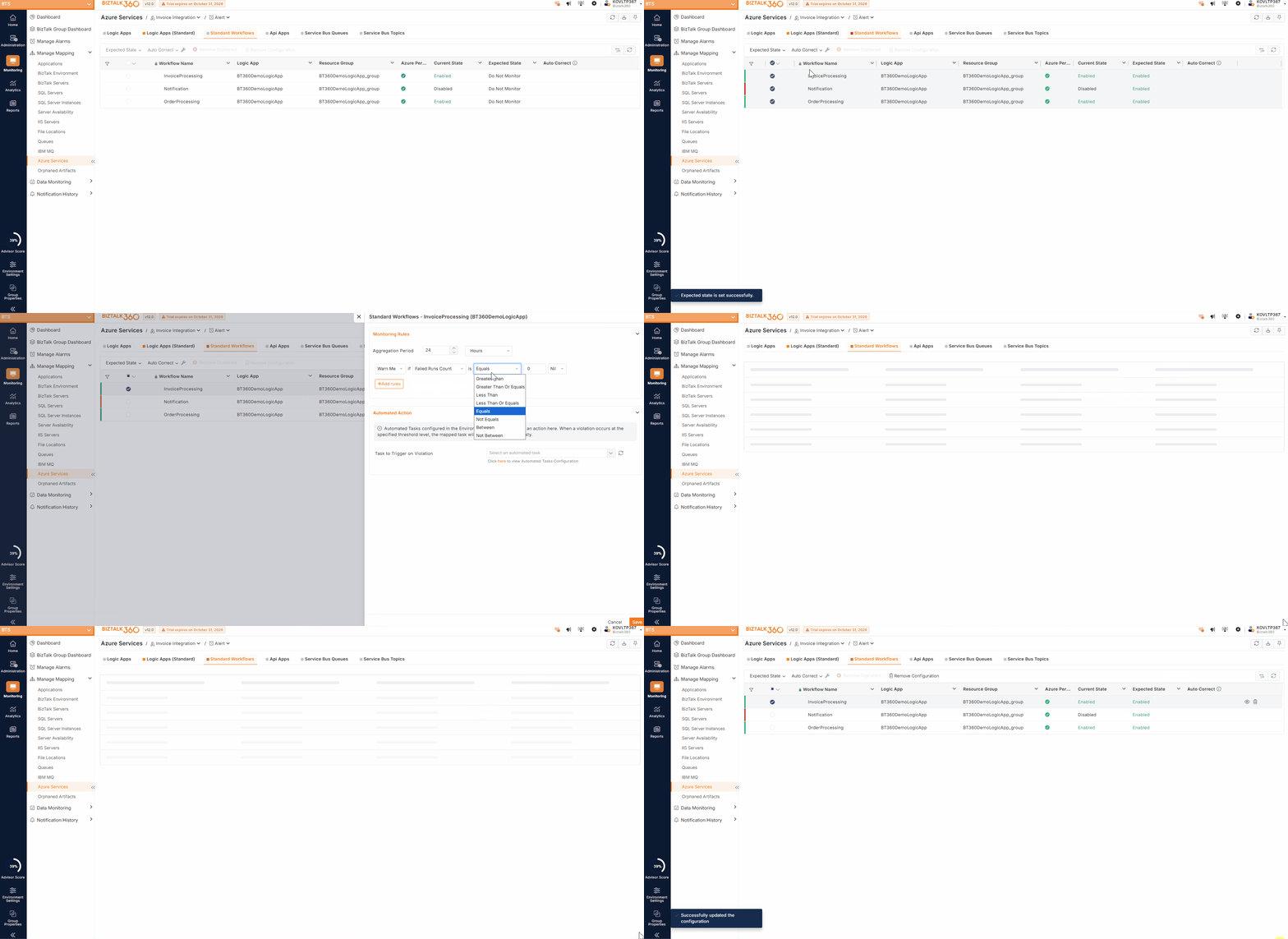
With BizTalk360, administrators can monitor the workflow state and configure threshold rules for failed triggers and failed workflow runs.
For example, if the failed run count exceeds the configured threshold, BizTalk360 can trigger an alert. The operations team can investigate the workflow and take corrective action before the issue affects more business transactions.
Administrators can monitor:
Threshold-based monitoring rules can be configured to identify workflow failures and unexpected execution patterns.
Also, administrators can configure Standard Logic App workflows as Automated Actions and associate them with relevant monitoring violations.
Organizations managing multiple BizTalk Groups often need to switch between environments to understand their overall performance. Comparing server resource utilization and message-processing activity across different groups can be time-consuming.
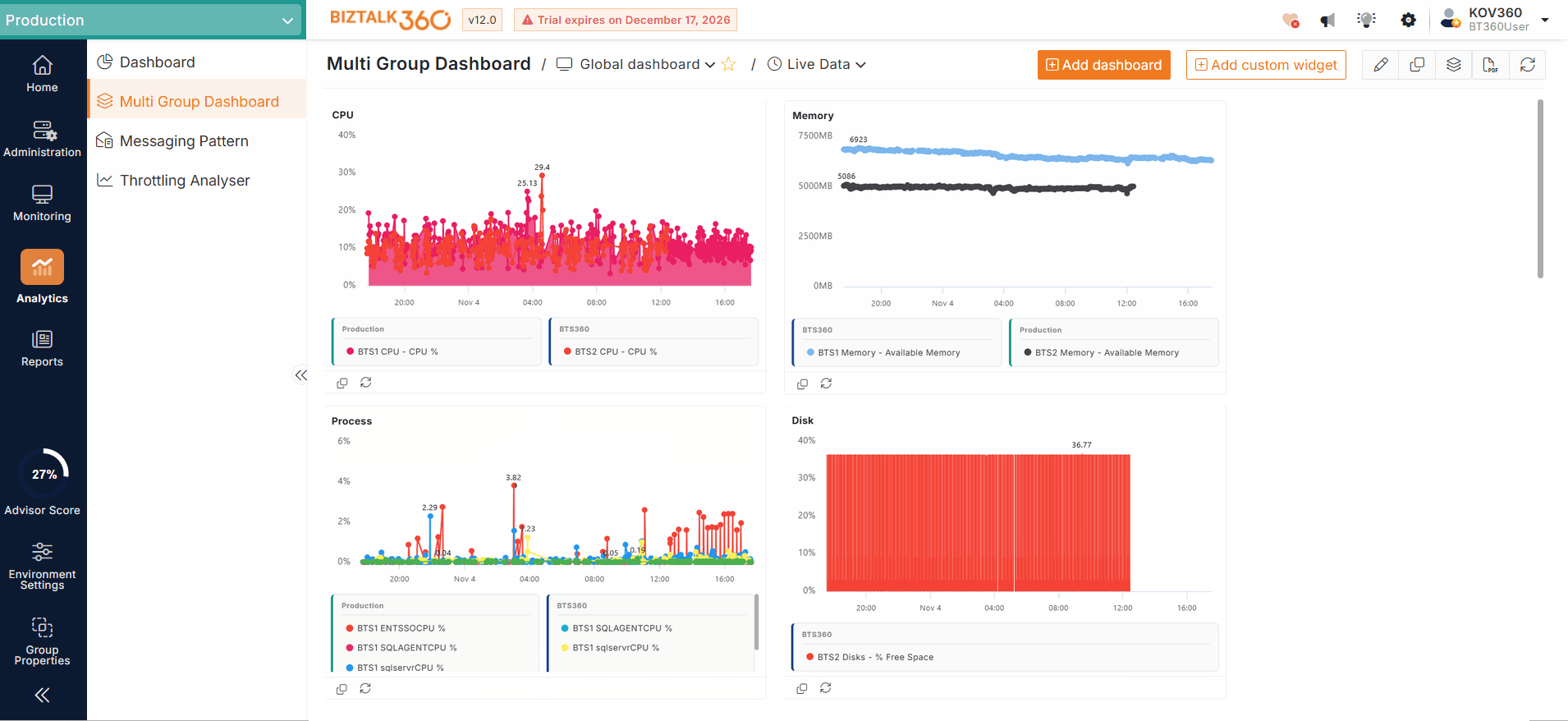
Multi-Group Analytics Dashboard, provides a unified view of Server Performance and Message Performance insights across multiple BizTalk Groups.
Administrators can analyse performance trends across groups from a single dashboard, making it easier to identify resource-intensive environments and investigate performance bottlenecks.
Email notifications are an important part of monitoring because they help administrators stay informed about infrastructure and application issues.
Previously, the delegated OAuth authentication approach depended on an interactive user sign-in. If the refresh token expired after 90 days of inactivity, the user needed to sign in again to restore email notifications.
Client Credentials-Based Email Authentication is introduced, providing an alternative authentication mechanism using an application registration.
Administrators can configure the following details from the application registration:
Once configured with the required permissions, BizTalk360 generates an access token whenever it needs to send an email notification.
Chromium and Playwright have been upgraded to the latest supported versions to enhance browser compatibility and security during report generation.
Microsoft Edge support has also been introduced, with Edge configured as the default browser for report generation.
Security remains an important focus in every BizTalk360 release. In v12.0, we have introduced additional security improvements to strengthen application protection and secure communication.
Key enhancements include:
Alarm processing has been optimized to dynamically adjust concurrency based on available CPU cores and real-time CPU utilization. This helps balance monitoring performance and resource utilization.
SQL connection pooling has been introduced for BizTalk360 database connections to improve performance and reliability under high load.
The default configuration is:
Connections are reused from a managed pool instead of repeatedly creating new database connections. Pooling can be disabled by setting Pooling = False in the configuration file.
BizTalk360 v12.0 brings together platform modernization, enhanced infrastructure monitoring, improved workflow visibility, modern email authentication, and additional security enhancements.
Upgrade to BizTalk360 v12.0 and experience smarter monitoring and simplified management.