


Nekalya Kundan
Author
Published on : Aug 25, 2026
Category : BizTalk360 Monitoring
Maintaining the health of a BizTalk Server environment requires regular monitoring and timely maintenance to ensure smooth and reliable operations. BHM provides valuable insights into the overall health of the environment and identifies recommended maintenance actions. BizTalk360 enhances this experience with BHM Maintenance and BHM Custom Schedule, allowing administrators to establish a recurring health-check routine and address maintenance requirements identified during ongoing health monitoring. With flexible daily, weekly, and monthly scheduling options, administrators can maintain a consistent health-check routine, minimize manual effort, and simplify BizTalk Server management.
The BHM Custom Schedule option in BizTalk360 allows administrators to schedule the execution of selected BHM profiles at a predefined time and frequency. Instead of manually running profiles whenever a health report is required, administrators can configure a recurring schedule based on their monitoring requirements.
The feature supports Daily, Weekly, and Monthly scheduling options, providing the flexibility to establish a consistent health-check routine and generate BHM reports at scheduled intervals.
The Custom Schedule provides three scheduling options:
These options allow administrators to choose a scheduling pattern that aligns with their organization’s health-check requirements.
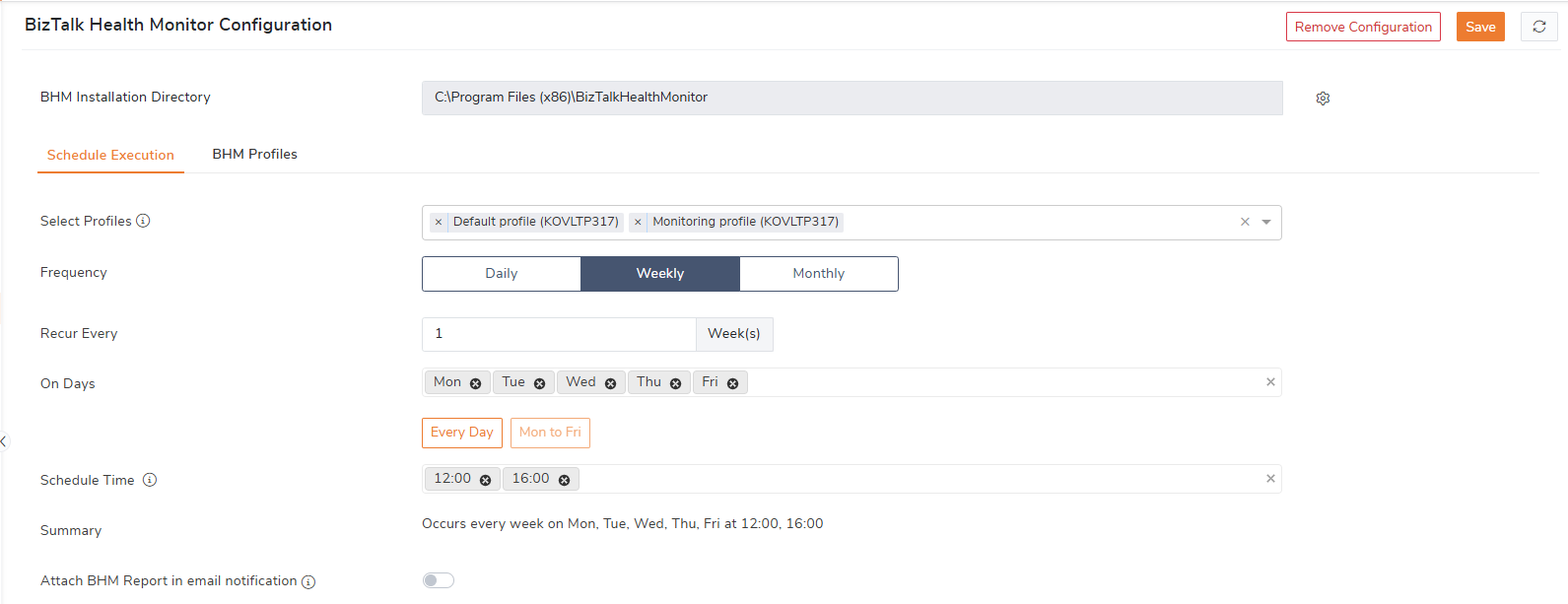
Once the schedule is configured, BizTalk360 automatically executes the selected BHM profiles according to the defined schedule and generates the corresponding BHM health reports.
This ensures that up-to-date health information is available for review without requiring administrators to trigger the profiles manually.
Consider an organization that performs a weekly BizTalk Server health review every Monday. Previously, an administrator had to manually execute the required BHM profiles before the review.
With BHM Custom Schedule, the administrator can select the required profiles and configure a Weekly schedule to run every Monday at 4:00 PM. BizTalk360 automatically executes the profiles and generates the BHM reports at the scheduled time.
The team can then review the reports as part of their weekly health-check process, helping them identify potential issues and take appropriate action without relying on manual execution.
BHM Maintenance in BizTalk360 helps administrators manage and maintain BHM data efficiently. The maintenance activity can be performed on demand from the Administration section or automated through an Automated Task based on a defined schedule. This provides flexibility to perform maintenance when needed while also supporting regular, scheduled maintenance with minimal manual effort.
Administrators can trigger BHM Maintenance manually from the Administration section whenever an immediate or on-demand maintenance activity is required. This provides administrators with control over when the maintenance operation is initiated and allows them to review and validate the recommended maintenance actions before execution.
The manual trigger is useful when maintenance needs to be performed during a planned maintenance window or when an administrator wants to review the current recommendations before proceeding.
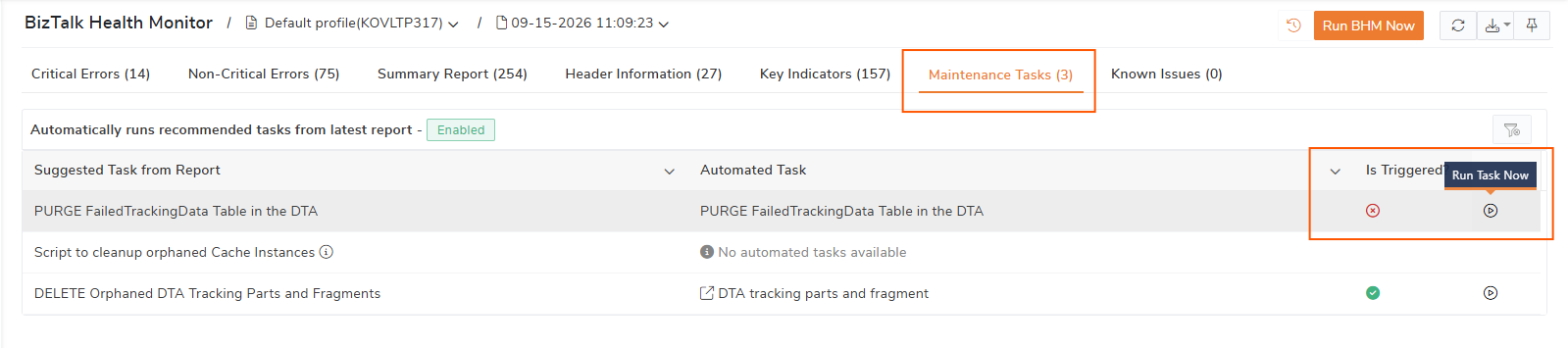
For recurring maintenance, administrators can configure BHM Maintenance as an Automated Task. Once configured, BizTalk360 automatically performs the maintenance according to the defined task schedule, eliminating the need for administrators to trigger the activity each time.
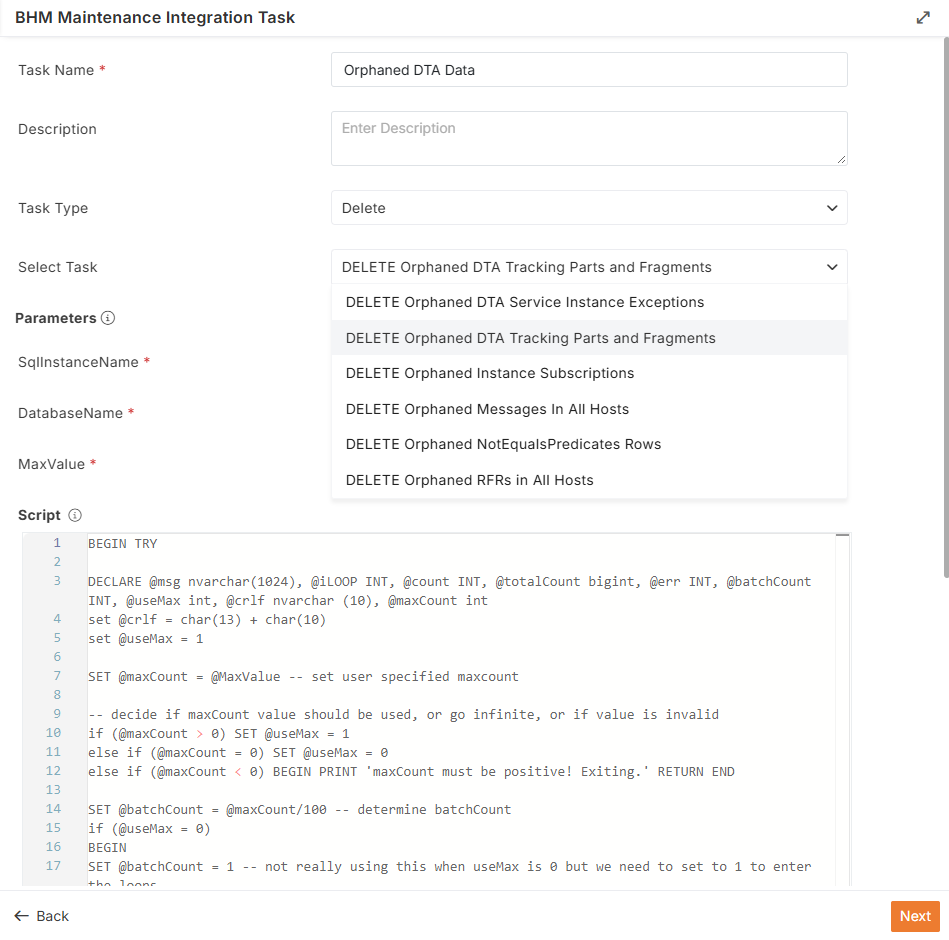
After the weekly health-check process, the BHM report is generated every Monday at 4:00 PM. The report highlights issues identified in the BizTalk environment, including cases where orphaned DTA tracking data is present. Over time, tracking data can become orphaned when tracked message parts or their associated fragments no longer have their corresponding message or tracking part available.
To simplify the cleanup, the administrator can configure Delete Orphaned DTA Tracking Parts and Fragments as an Automated Task and map it to the respective BHM profile. Once the BHM report is generated, the mapped task can be executed to clean up the identified orphaned DTA tracking data. During execution, the task first removes the orphaned tracking parts and then removes the associated orphaned fragments.
When the BHM report identifies a significant amount of orphaned DTA data, it recommends the Delete Orphaned DTA Tracking Parts and Fragments maintenance task in the Administration section for the respective BHM profile. The administrator can review the recommendation and manually execute the task when cleanup is required.
Maintaining a healthy BizTalk Server environment requires regular health checks and timely maintenance. With BHM Maintenance and BHM Custom Schedule, BizTalk360 simplifies these activities by reducing manual effort and automating routine BHM operations. Administrators can schedule BHM profiles to run daily, weekly, or monthly and perform maintenance manually or through Automated Tasks. Together, these capabilities help ensure consistent health monitoring and make it easier for teams to review BHM reports and maintain their BizTalk Server environments efficiently.
To know more about the BizTalk360 features, try out the free trial or book a demo.